Today, I faced a problem while uploading some videos to my iPhone, as you all know that Apple only supports MPEG-4 (.mp4). I tried hard to find a way to upload my .avi videos on iPhone 4 without conversion and luckily I found a very easy method for doing this.
Here I am going to explain it in three simple steps to play all media formats in iPhone using VLC player.
Requirements:
iPhone (Only jailbroken), Data Cable, Laptop.
Step 1: Install Video Lan (VLC) from Cydia.
To install VLC in Cydia, open Cydia and tap “Manage.” From here, tap “Sources, then “Edit,” then “Add.” Now you will be prompted with an entry field for your new source. Add “http://rpetri.ch/repo” and click “Add Source.” Cydia will then verify the source.
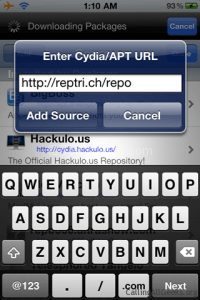
VLC Player Source: Cydia
Once you’ve done that, head over to “Search” in Cydia and search for “VLC media player.”
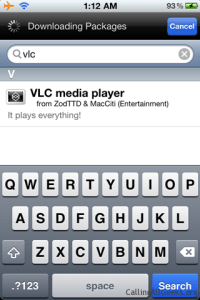
Search VLC in Cydia
Note:
Once you install VLC Player from Cydia, remember that the method for putting videos in your VLC library is a bit different than it was for the official App Store version. Since this version is not from the App Store, iTunes will no longer allow you to sync videos to your library through its interface. Instead, you need to install OpenSSH (again from Cydia) and SFTP client.
Step 2: Install OpenSSH from Cydia by going to the ‘Search’ tab and search for ‘OpenSSH’ in Cydia.
Once the page for OpenSSH loads, tap ‘Install’ in the upper-right corner, and when the next page loads, tap the ‘Confirm’ button, which will be in exactly the same spot. (If the button in the upper-right says, ‘Modify’ instead of ‘Install,’ then you already have OpenSSH installed, and you can skip to the next step.
Step 3: Now download your Favourite SFTP client (or search it from google) on your laptop.
After downloading iTools, run it and connect your iPhone to your laptop via data cable. Browse to /var/mobile/documents and upload your videos.
Close the VLC player on your iPhone and open it again. Hurray they videos are there, and now you can play them.
Hope this article will help you but remember again, that this is only for jailbroken iPhone.
Update:
VLC player for iPhone and iPad returns with several new features like Wi-Fi upload, Dropbox sync and much more. The App was removed from App Store some years ago over the copyright issues with the GPL license. But now, its back on iTunes and you can download the app ( iTunes App Link ) without any hacks directly from App Store.

This VLC glitch is outdated. Instead, use the iTune’s store directly to install this app.

Wanted excellent write up. This in reality was a new satisfaction bill the item. Seem intricate to more increased pleasant on your part! Even so, how can we connect?