The iPhone has many attractive features for the user. There are times when you may be unwinding with friends and family and not in the mood to receive calls from the office. There are other instances where you may not want to receive calls from a particular location as you are engaged with someone else or something else. The iPhone here brings to you a very unique feature called the “Call Bliss.” This feature makes the blocking and unblocking of calls a reality and you get the benefits of taking the calls you wish to and blocking the calls you do not want to receive temporarily.
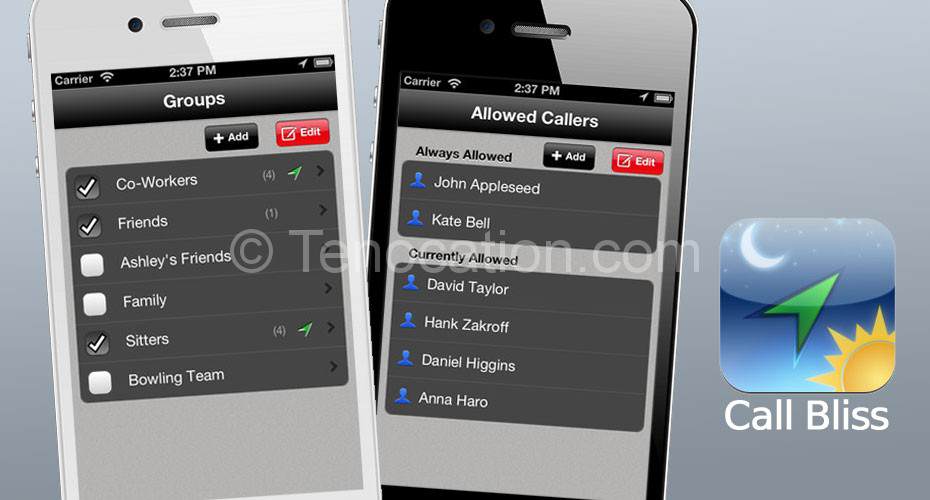
How Does Call Bliss Work?
Call Bliss is a different kind of “do not disturb” feature. When you are using the “Do Not Disturb” mode in your device the incoming call is silenced. However with Call Bliss you never miss any call. At the same time, you can enjoy what you are doing without any kind of hassles and worries that your boss or colleague may call while you are in leisure.
This App of the iPhone permits necessary calls to ring on the phone and it managed those who can ring you based on wherever you are.
The App is a quick one allowing you to make a list of places and people. You can categorize positions into “home” “gym” “school” “market” and more. People can be listed as “friends,’ “colleagues” acquaintances” and more. Once you have made the list of places and people you need to assign contacts into these groups. After this the App works and from here you get the list of places where you can be reached by the group. This means you can permit colleagues to call you when you are at work or business, but you can block their calls when you are watching a movie with family or loved ones.
Once you have been over with the settings you can ignore calls without hassles. The App tends to work automatically as it has the ability to detect the place where you are geographically located. This helps you get the freedom from calls you do not want. You receive only calls that are expected.
Now the question comes to your mind as what happens to the calls you block?
The answer is simple. These calls are directed to the voicemail option. This gives you the chance to check them later. The people who are calling you will not feel you are avoiding or ignoring them. There are two features of this App and that is “allow all calls” and “block all calls.”
Are there Any Cons Of Call Bliss?
Call Bliss is an application that deploys the Global Positioning System or GPS. This means the App will drain your battery life when you use it. It is smart to use this App only when you need it and want to block those calls that may disturb you. Do not activate the App all the time as this will drain your battery life and you have to keep your phone on the charging mode most of the time.
Thus, if you are one of those who love to balance work and family every day, Call Bliss is the ideal App for you and your family. With it, you can concentrate fully on any activity without the frequent interruptions of a phone call you do not want. As mentioned above there is just one small thing you have to remember if you want to save your battery life- do not keep Call Bliss on every time or else you need to carry your charger everywhere you go!

Call Bliss is available from the iOS App Store for $9.99.

Please see if you can help me?