With the advent of the Apple’s latest iOS, all the iPhone users in the game are go gaga over the new operating system. Just hold your curiosity right there! This update brings to you a detailed step by step guide to upgrade your current iOS to the latest iOS and discusses the complexities and the repercussions associated with the same. So let’s begin.
Does your device satisfy the requirements set?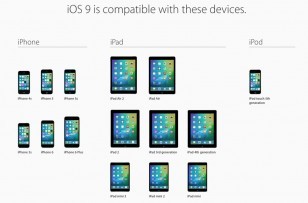
Being unveiled in June 2015, iOS 9 is now available for upgrade to all the iPhone or the iPad or the IPod touch users.
The most basic requirement is to check whether the Apple device which you have in your pocket as of now is either an iPhone 4S or any model post that or an iPad 2 or any model post that or either of the iPad models. If your device satisfies these prerequisites, then your device is fit for upgrade!
Yes? Then follow this guide
You will get a notification notifying you that you that you are eligible for the upgrade to iOS 9. Then you can,
- Confirm that you are willing to download the upgrade.
- Then, you need to download the iOS 9 installation file and install it.
- The iOS 9 will then present you with the upgrade and notify you with the storage space that’s needed to install the update.
- You can confirm that you want to upgrade and things just go on smoothly.
In order to locate the download notification, you need to: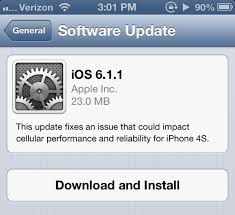
- Go to the settings section. Then go to General and then select Software Update. Doing this will prompt your iPhone to check for the latest updates.
- The device will start downloading the update and once it is downloaded, you will definitely receive a notification.
- This takes you to Settings. Go to General and then select, Software Update. The update then automatically begins to install.
Note:
If there isn’t enough space on your device to manage the update, you obviously need to delete the files from your phone in order to make sure that there’s enough room on your device.
There’s another solution though. You can update your iOS via. the iTunes on your MAC device.
Should you upgrade?
Also check: Underpinnings As To “Why You Shouldn’t Switch To iOS 9″
Now, you might be having a lot of questions such as if you should upgrade to the latest iOS or not. If yes, why? and if no, why? We will try to address your queries in the best manner possible.
One needs to analyze the pros and cons in order to arrive at such a conclusion. So, listing down the pros :
- The Camera feature in the latest upgrade has many
 additional features including a
real-time exposure adjustment, a timer as well as an extension of the current features in your current iOS. - Voice messaging from within the Messages app is another feature.
- Severe enhancement of the keyboard which implies a whole-word predictive typing. Also, it enables you to download third party keyboards such as Swype.
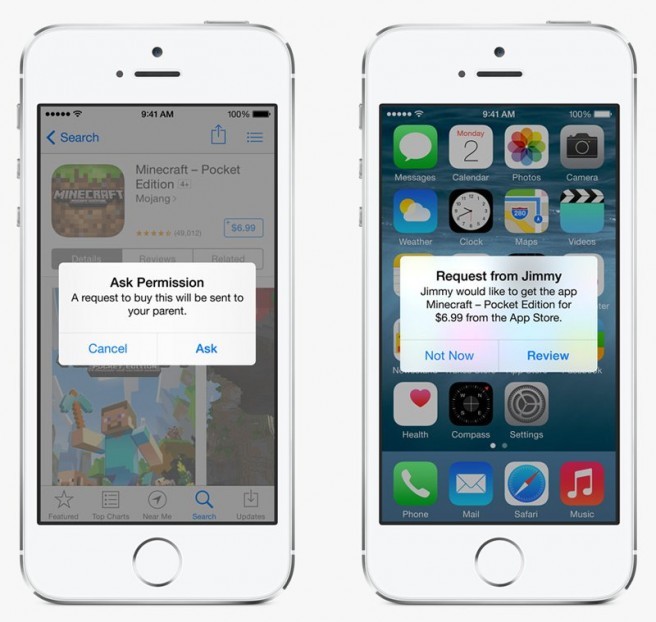
- A new family share feature which helps you to share applications and media as well as location data within your family. A screenshot from this feature can be seen below. The parents can also restrict the access to some limited apps if they wish to.
On the other hand, the cons to updating to iOS can be listed down as:
- Firstly, if your device is older and doesn’t fit in the requirement set mentioned towards the beginning of this article, please don’t stress yourself. The latest upgrade isn’t for you.
- Updating to the latest iOS would be an irreversible process. You would just have a pretty small window after upgrading to the latest iOS when you can go back to the previous OS but after some time, downgrading becomes really difficult and in the meantime, if you start encountering issues with the latest OS, you are stuck.
- If you are into jailbreaking or you like jailbreaking devices, you must not upgrade your device as soon as the latest upgrade arrives. At least, wait till the jailbreak arrives and even then, wait for it to successfully penetrate the latest OS.
- Speed is probably another cause as well as the most important reason as to why you must not upgrade to the latest OS. If you are running an older model say an iPhone 4S, there are high chances that your device might get slow. It’s probably because the older hardware struggle to run it.
So, as you can see, the latest iOS would probably have tons of features which would be remarkable. But, at the same time, the cons associated with upgrading to the latest iOS are so severe that you must compensate by sacrificing your need for all the latest features with the latest iOS update would bring with it.
We hope this update helped you out by giving you instructions on how to upgrade your device and whether you should upgrade it or not!
Stay tuned to TechWhich for more updates!
Leave a Reply